

One eSIM for 200+ countries — instant delivery, no physical SIM, no roaming surprises.
200+
Countries & regions
4G/5G
Network speeds
< 1 min
Activation time
From $1
Plans start at
Everything you need to stay connected — nothing you don't.
Countries & Regions
One eSIM for every continent — Europe, Asia, Americas, and beyond.
Activation Time
Get online instantly. No waiting, no shipping, no store visits.
Network Speeds
Premium local networks wherever you land — always fast, always reliable.
Lock-in Fees
No contracts, no surprises. Pay only for what you need, when you need it.
Getting connected abroad has never been easier.
Search for your destination and browse plans by data, validity, and price.
Receive your eSIM QR code instantly. Scan it in your phone settings — done.
Activate on arrival and connect to a local 4G or 5G network automatically.
Compatible with
Vell eSIM works with iPhone XS and later, Samsung Galaxy S20+, Google Pixel 3+, and hundreds of other eSIM-capable devices.
Some models built for China or regional markets may not support eSIM.

Indonesia
Data
Unlimited
Validity
10 days
2 Providers

New Zealand
Data
Unlimited
Validity
10 days
1 Provider

Japan
Data
Unlimited
Validity
15 days
2 Providers

United States
Data
Unlimited
Validity
15 days
1 Provider

Singapore
Data
Unlimited
Validity
5 days
1 Provider

Thailand
Data
Unlimited
Validity
10 days
1 Provider

United Kingdom
Data
Unlimited
Validity
10 days
3 Providers

Spain
Data
Unlimited
Validity
15 days
2 Providers

France
Data
Unlimited
Validity
15 days
1 Provider

Italy
Data
Unlimited
Validity
15 days
3 Providers

South Korea
Data
Unlimited
Validity
10 days
1 Provider

Turkey
Data
Unlimited
Validity
10 days
1 Provider
Everything you need to know about Vell eSIM.
An eSIM is a digital SIM card built into your device. Instead of inserting a physical SIM, you install a mobile plan directly through your phone.
Yes, you will need an internet connection (Wi-Fi or existing data) to install and activate your eSIM. We recommend installing your eSIM before you travel, while you still have a stable connection. This helps ensure everything is set up and ready to use when you arrive at your destination. Installing your eSIM early does not mean your plan will start immediately – your plan will only activate once it is connected to a supported network for your selected destination.
Unused data will expire at the end of your plan and cannot be carried over.
Unlimited data is available in some destinations. Availability depends on the country and local network providers. You can view available plans for your destination before purchase.
Yes, if you purchase a regional eSIM. You can use it across multiple supported countries within that region. Each plan will list the countries it covers, so you can stay connected as you travel between destinations without needing to switch eSIMs.
To manage your eSIM plans, go to "eSIM" in the Vell app and tap "View Details" to see your total data, data used, and remaining balance. You can also top up your current plan.
To install your Vell eSIM using a QR code: 1. Go to your device's mobile or cellular settings. 2. Tap "Add eSIM" or "Add Mobile Plan". 3. Select "Scan QR Code". 4. Scan the QR code provided. 5. Follow the on-screen instructions to complete installation. We recommend installing your eSIM before travel. Activation will only occur once your device connects to a supported network for your plan.
When you arrive at your destination, make sure your eSIM is turned on. It will activate automatically once it connects to a supported network, this usually takes just a few minutes.
Most newer smartphones support eSIM, including:
- iPhone XS and newer
- Google Pixel 3 and newer
- Samsung Galaxy S20 and newer
Please check your device settings to confirm compatibility before purchase.
You can download the Vell app from the App Store (iOS), Google Play Store (Android), Huawei App Gallery (Harmony OS).
To remove an eSIM from your device, go to your mobile or cellular settings, select the eSIM you want to remove, and tap "Remove eSIM" or "Delete Mobile Plan". Please note that once an eSIM has been deleted, it cannot be reinstalled using the same QR Code.
You can track your data usage directly in the Vell app. Go to "eSIM" and tap "View Details" to see your total data, data used, and remaining balance.
Yes, you can use 5G where it is available. Your device will automatically connect to the fastest network if your device is compatible and the local network supports it.
Vell eSIMs are data-only and do not support SMS or calls. To receive SMS and calls, you can keep your primary SIM active while using your Vell eSIM for data. Please note that your primary SIM provider may charge roaming fees for SMS and calls while overseas.
You can top up your eSIM directly in the Vell app. Go to "eSIM", select "View Details" and tap "Top Up" to add more data.
Vell eSIMs are data-only and do not support phone calls or SMS. You can still use apps like WhatsApp, FaceTime, or Messenger to make calls and send messages using data.
Yes, you can use Personal Hotspot to share your data with other devices. Availability may depend on your device and local network conditions.
The number of eSIMs you can install depends on your device. Most devices allow multiple eSIM profiles to be stored, but only one or two can be active at the same time.
An eSIM can only be installed on one device and cannot be transferred after installation. If you want to use your data on another device, you can share it using Personal Hotspot from your current device. If your device is no longer usable, you will need to purchase and install a new eSIM on your new device.
This depends on your device. Some devices support using two eSIMs at the same time, while others only allow one active eSIM at a time. Please check your device specifications for compatibility.
Yes. Most devices support Dual SIM (physical SIM + eSIM). This means you can keep your main number active and use eSIM for data while traveling.
Your eSIM activates when it is turned on and connected to a supported network at your destination. Your plan will start from the moment it is activated.
You can find it in the Vell app. Go to "eSIM" and select "QR Code".
Use your phone as a hotspot (most common): Turn your phone into a Wi-Fi hotspot and connect your laptop to it. 1. Turn on Personal Hotspot (iPhone) or Mobile Hotspot (Android). 2. On your laptop, connect to your phone's Wi-Fi. 3. Enter the password — you're online.
Laptop with built-in SIM/eSIM: Some laptops support cellular directly. 1. Insert a SIM or install an eSIM. 2. Turn on Cellular in laptop settings. 3. Connect like a phone.
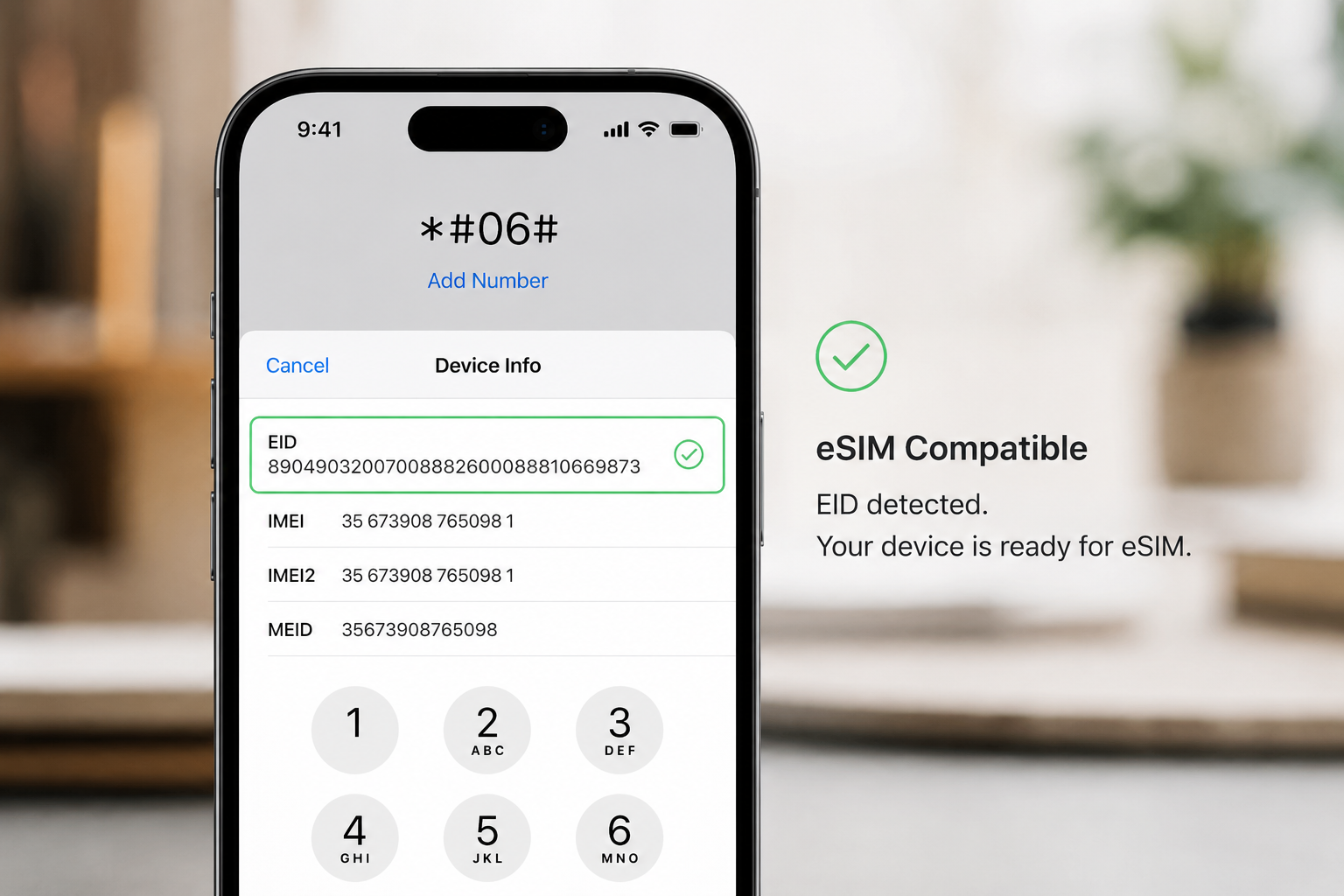
Quickest way: Dial *#06#. If your device shows an EID number, it supports eSIM. This works on any devices regardless of device model.
On iPhone: Go to Settings → Mobile (or Cellular) → Add eSIM. If you see "Add eSIM", your device supports eSIM.
On Android: Go to Settings → Connections → SIM Manager. If you see an option like "Add eSIM" or "Download SIM", your device supports eSIM.
